Nejlepší dálkové ovladače pro seniory: jak vybrat ten pravý
Hledáte jednoduchý dálkový ovladač pro rodiče nebo prarodiče? Poradíme vám, co sledovat při výběru, jaké typy jsou nejlepší pro starší uživatele a jak ovladač správně nastavit.
Dálkový ovladač patří k nástrojům, které používáme každý den – a přesto se mu při nákupu nové televize nebo audio systému věnuje překvapivě málo pozornosti. Pro seniory je to ale klíčový prvek domácí elektroniky. Příliš malá tlačítka, nepřehledné rozmístění, chybějící podsvícení – to vše může zkomplikovat každodenní život. V tomto článku vám poradíme, jak vybrat dálkový ovladač, který bude opravdu vhodný pro starší uživatele.
Proč senioři potřebují jiný ovladač?
Standardní dálkové ovladače dodávané k televizím obsahují desítky tlačítek – a mnohá z nich senior nikdy nepoužije. Problém je ale v tom, že tato tlačítka zbývající funkce znepřehledňují a zmenšují. Výsledkem jsou přeplněná zařízení, se kterými je obtížné ovládat jednoduché funkce, jako je přepínání kanálů nebo regulace hlasitosti.
Senioři navíc mohou mít oslabený zrak, sníženou citlivost prstů nebo třes rukou. Ovladač s logickým rozmístěním, velkými tlačítky a dobrým podsvícením jim může výrazně zjednodušit život.
Co sledovat při výběru?
1. Velikost a rozmístění tlačítek
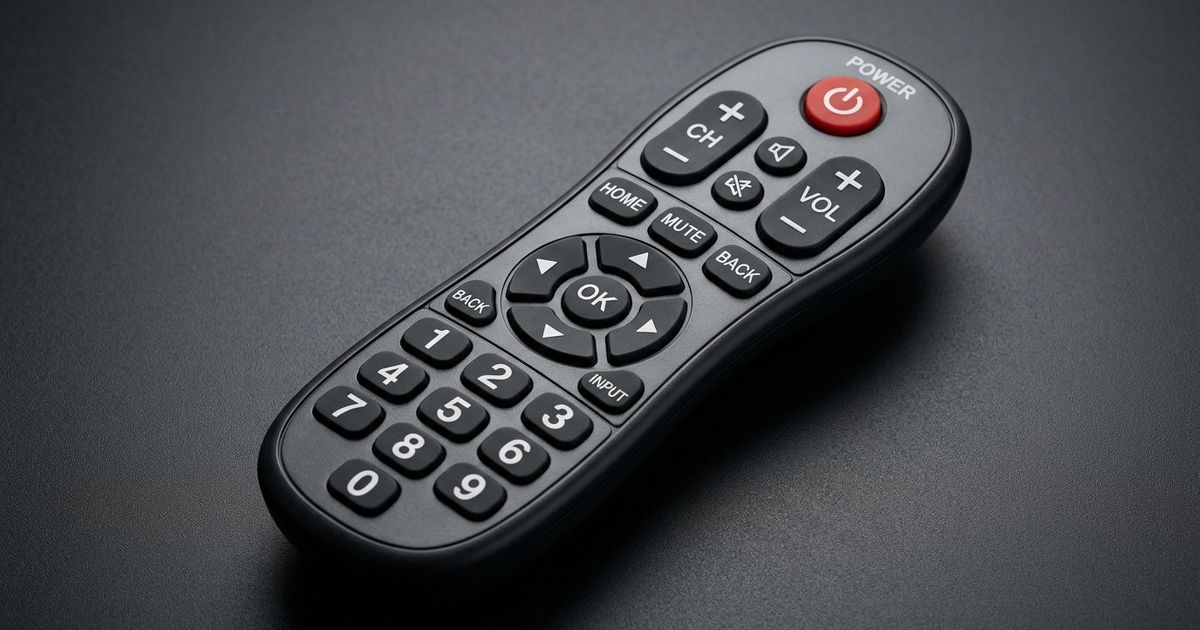
Ideální ovladač pro seniory má tlačítka dostatečně velká, aby nebyl problém je trefit. Nejdůležitější jsou tlačítka pro zapnutí/vypnutí, přepínání kanálů a regulaci hlasitosti – ta by měla být výrazně zvýrazněna nebo umístěna na logickém místě.
Tip: Hledejte ovladače, kde jsou klíčová tlačítka barevně odlišena nebo fyzicky větší než ostatní.
2. Podsvícení tlačítek
V šeru nebo při sledování večerního programu je podsvícení nezbytné. Ovladač s podsvícenými klávesnicemi usnadní orientaci bez nutnosti zapínat světla. Podsvícení se zpravidla aktivuje pohybovým senzorem nebo stisknutím jakéhokoli tlačítka.
3. Jednoduchost – méně je více
Zjednodušené ovladače (tzv. „senior dálkové ovladače") nabízejí jen základní funkce: zapnout/vypnout, kanály, hlasitost a někdy programovatelná oblíbená tlačítka. Takové ovladače jsou ideální pro seniory, kteří nepotřebují přístup ke složitým nastavením Smart TV.
4. Hmotnost a ergonomie
Těžký ovladač může být pro seniory s artritidou nebo sníženou svalovou sílou nepohodlný. Hledejte lehká zařízení s příjemným úchopem – mírně zaoblený tvar drží se v ruce lépe než plochý ovladač.
5. Typ baterií a výdrž
Klasické AA nebo AAA baterie jsou nejpraktičtější – jsou dostupné všude. Dbejte na to, aby byl přístup k baterijovému prostoru snadný, bez nutnosti použití nástrojů.
Typy ovladačů vhodných pro seniory
Zjednodušené (dedikované) ovladače pro seniory
Tyto ovladače mají minimální počet tlačítek a jsou navrženy přímo pro starší uživatele. Bývají větší, s kontrastními tlačítky a jasným displejem nebo přehledným rozvržením. Příklady zahrnují modely od značek jako One for All, Philips a Logitech.
Univerzální ovladače s jednoduchou konfigurací
Dobrou volbou jsou také univerzální ovladače, které lze naprogramovat na konkrétní televizor nebo set-top box a přitom nabízejí přehledné rozmístění tlačítek. Ovladače z řady One for All Contour jsou populární právě pro svou jednoduchost.
Ovladač zabudovaný do tabletu nebo telefonu
Pro pokročilejší seniory, kteří používají smartphone, je zajímavou alternativou aplikace pro ovládání televize přes infraport nebo Wi-Fi. Tato řešení ale vyžadují určitou technickou zdatnost a nejsou pro každého.
5 typů ovladačů z naší databáze — novinky pro rok 2026
V databázi devicero.cz průběžně přibývají nové modely dálkových ovladačů z celého světa. Mezi nejnovější přírůstky patří ovladače s podporou Bluetooth, univerzální modely kompatibilní s desítkami značek a zjednodušené seniory zaměřené typy. Veškeré aktuální modely najdete v naší kategorii:
👉 Prozkoumat všechny dálkové ovladače v naší databázi
Mezi aktuálně populárními typy patří:
- Zjednodušené ovladače s podsvícením – ideální pro každodenní použití bez zbytečných funkcí
- Univerzální ovladače kompatibilní se Samsung, LG, Philips, Sony a Panasonic
- Ovladače s velkými tlačítky a barevným rozlišením – navržené speciálně pro seniory
- Infrared-learning ovladače – naučí se kódy vašeho stávajícího vybavení
- Bluetooth/RF ovladače – fungují i bez přímé viditelnosti na přijímač
Jak nastavit ovladač pro seniora?
Krok 1: Vyberte jen to, co skutečně potřebuje
Před nákupem si zjistěte, jaká zařízení bude senior ovládat. Pokud jde jen o klasickou televizi bez Smart funkcí, stačí jednoduchý IR ovladač. Pokud má senior Smart TV nebo set-top box, může být potřeba program přizpůsobit konkrétnímu modelu.
Krok 2: Naprogramujte oblíbené kanály
Mnoho jednoduchých ovladačů umožňuje nastavit 3–6 programovatelných tlačítek na oblíbené kanály. To výrazně zjednodušuje přepínání bez nutnosti pamatovat si čísla.
Krok 3: Otestujte ergonomii
Dejte ovladač seniorovi do ruky a sledujte, jak s ním zachází. Pokud má potíže s konkrétním tlačítkem, lze zvážit samolepicí štítky s větším písmem nebo barevné popisky.
Krok 4: Zajistěte zálohu
Dobrou praxí je pořídit ke starému ovladači zálohu. Pokud se originální ztratí nebo rozbije, senior bude mít ihned náhradu.
Alternativy a doplňky
- Aplikace TV Remote (iOS/Android) – ovládání přes smartphone, pokud má televize Wi-Fi
- Hlasové ovládání – moderní Smart TV od Samsungu nebo LG umožňují ovládání hlasem; senior tak nemusí manipulovat s žádným ovladačem
- Chytrý reproduktor (Amazon Echo, Google Nest) – propojení s televizí přes Alexa nebo Google Assistant nabízí komfortní hlasové ovládání
Závěr
Správně vybraný dálkový ovladač může výrazně zlepšit každodenní pohodlí seniora. Klíčem je jednoduchost, velká a přehledná tlačítka, podsvícení a snadná obsluha. Nemusíte hledat nejdražší model – důležité je, aby ovladač splňoval konkrétní potřeby uživatele.
Pokud vás zajímají i další tipy, přečtěte si naše související články:
- Jak vybrat náhradní dálkový ovladač k televizi
- Jak naprogramovat univerzální dálkový ovladač
- Nejčastější poruchy dálkových ovladačů a jak je opravit
Máte otázku nebo tip na konkrétní model? Napište nám přes kontaktní formulář – rádi poradíme.